Official JobTread Partner

JobTread Is Great. This Makes It Awesome.

The all-in-one browser extension toolkit that transforms JobTread into a powerhouse. Dark mode, rich text formatting, message templates, job switcher filtering, and more.

5.0 on Chrome Web Store · 700+ contractors · 20+ features
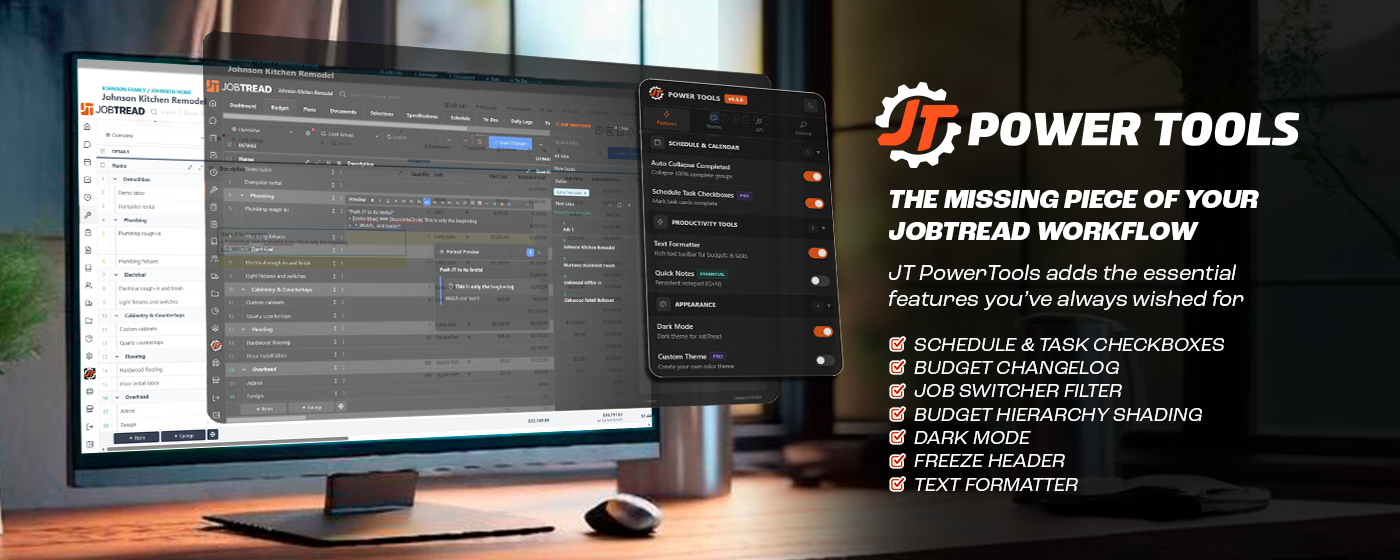
JT Power Tools running inside a JobTread budget view on a desktop workstation.
The Difference

JobTread, now with Power Tools.

Standard JobTread

  • Blinding white screen, even at midnight
  • Job switcher is one long list of every job — open, closed, archived — scroll or type to find it
  • Assignee picker shows every member and every vendor with no way to filter
  • Open task cards individually to check them off
  • Plain text fields for notes and budget descriptions
  • Type the same signature and canned replies every time
  • Re-type messages to count characters

With Power Tools

  • True dark mode for late nights and early mornings
  • Job switcher with filters — status, stage, recently opened
  • Availability filter hides off-duty members and inactive vendors
  • Checkboxes on schedule cards — one click, no modal
  • Rich text with lists, colors, tables, headings
  • Saved templates paste in one click
  • Live character counter on every message field
What's in the Kit

One Extension. Every Fix.

20+ features across scheduling, formatting, theming, and AI. Each toggle-able. All one install.

Dark Mode

A true dark theme for JobTread. Late nights, early mornings, and tired eyes — all covered.

Text Formatter

Rich text toolbar with bold, italic, headings, tables, links, and alert blocks. Keyboard shortcuts included.

Contrast Fix

Automatic text color adjustment for WCAG-compliant readability across every JobTread screen.

Message Counter & Templates

Live character count on every message field, plus saved templates you can paste in one click.

Budget Hierarchy Shading

Progressive visual shading for nested budget groups — up to 5 levels deep, instantly scannable.

Auto Sum

Totals helper that sums selected budget cells instantly. No formulas, no exports.

Kanban Type Filter

Auto-hide empty Kanban columns so your board shows only what's in play today.

Auto Collapse Groups

Collapses 100% complete budget groups on load so you focus on what still needs work.

Essential

Quick Notes

Persistent notepad with markdown support, WYSIWYG editor, and cross-device sync.

Essential

Smart Resize

Drag any sidebar or panel edge to resize it. Tune your JobTread layout to your workflow.

Essential

Freeze Header

Sticky column and row headers on long tables so you never lose your bearings while scrolling.

Essential

PDF Markup Tools

Professional stamps, improved eraser, and redlining tools for construction plans and change orders.

Essential

Reverse Thread Order

Flip message threads so the newest posts stay on top — no more scrolling to the bottom.

Pro

Schedule Task Checkboxes

Check off tasks directly from schedule cards. One click, no modals, no context loss.

Pro

Custom Theme

Personalize JobTread with your own color palette. Save up to 3 themes for quick switching.

Pro

Preview Mode

Live markdown preview with a floating panel. See rendered budget descriptions and daily logs as you type.

Pro

Availability Filter

Hide off-duty members and inactive vendors from assignee pickers. Only see who can actually take the job.

Power User

Job Switcher Filter

API-powered job filtering by status, stage, custom fields, and recency. Find any job in seconds.

Power User

Budget Changelog

Compare any two budget backups side-by-side. See exactly what changed, when, and by how much.

Power User

Unassigned Availability

Spot unassigned tasks and open availability across the schedule without clicking through each day.

Install

Everywhere You Work.

Use Brave, Arc, or Opera? Choose Chrome — same store. · Safari supports extensions on iPhone & iPad.

AI Toolkit · Included with Power User

Your AI Needs A Toolbelt.

Connect Claude, ChatGPT, Gemini, Cursor, or any MCP-aware client directly to JobTread — across every org you manage. Your AI gets real job data, schedules, and budgets, not stale copy-paste.

Example Prompts
"Compare this bid request against the project scope" "Pull key metrics for my production meeting" "Forecast labor needs for the next 2 weeks" "Pull historical budget data to develop costs for a new project"
How It Works

Three Steps. Zero Fuss.

Install in seconds, no account required to start.

01

Install the Extension

One click from your browser's store. Works on Chrome, Edge, Firefox — no signup, no setup.

02

Open JobTread

Everything activates automatically on app.jobtread.com. All free features turn on out of the box.

03

Turn On What You Need

Click the extension icon to toggle features. Upgrade in-app when you want Essential, Pro, or Power User tools.

Reviews

Loved By Contractors.

5.0 · 4 Reviews
Mar 17, 2026

"JT Power Tools is an amazing add on! Imagine using the awesome Job Tread platform with so much more! From holding the top line in place while you scroll down, being able to change the weight of the gant chart line so you can click on it, to handy project changer, and so many more additional features to customize your Job Tread experience! This tool is worth it's weight in gold!"

TK
Tracy Knutson
Mar 18, 2026

"We are new to JobTread and are really liking what we see. The add on of JT Power Tools makes this transition even better. I highly recommend adding this to your JT experience."

SR
Scott Rajavuori
Dec 2, 2025

"This is a badass extension for JobTread! Thank you so much for these tools!"

CU
Chris Uhler
Nov 16, 2025

"My Eyes!!!!! Love the dark mode. I'll be showing this to my other estimator this week!"

BM
Brendan McConkie
See all reviews on Chrome Web Store →

Join 700+ contractors already using JT Power Tools

Pricing

Choose Your Plan.

One subscription covers your entire organization.

Monthly Yearly Save 17%
Free
$0

Core tools to get started.

Install Free
  • Text Formatter
  • Dark Mode
  • Contrast Fix
  • Character Counter & Templates
  • Budget Hierarchy Shading
  • Budget Auto Sum
  • Kanban Type Filter
  • Auto Collapse Groups
  • Job Access Collapse
Essential
$10 /mo

Productivity tools for teams.

Get Essential
7-Day Free Trial
  • Everything in Free
  • Quick Notes
  • Smart Resize
  • Freeze Header
  • PDF Markup Tools
  • Reverse Thread Order
Pro
$20 /mo

Power users & customization.

Get Pro
7-Day Free Trial
  • Everything in Essential
  • Schedule & Task Checkboxes
  • Custom Theme (3 slots)
  • Preview Mode
  • Availability Filter
7-day free trial on all paid plans · 30-day money-back · Cancel anytime · One license per company
Ready?

Power Up Your JobTread.

Install in under 30 seconds. Keep everything free forever, or unlock the pros when you need them.

No account needed · Works on app.jobtread.com · Starts earning time back immediately